spendo
S5 Plus Wireless Gamepad Controller for Android and iOS
S5 Plus Wireless Gamepad Controller for Android and iOS
Couldn't load pickup availability
Mobile Games Deserve a Real Controller
Touchscreen controls work well enough for casual play. But the moment a game asks for precise analogue movement, simultaneous aiming and firing, or fast button combinations, flat glass becomes a genuine obstacle. Your thumbs drift, your inputs miss, and the gap between what you intended and what happened on screen widens every time the game gets demanding.
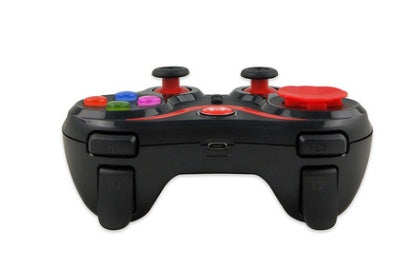
A proper wireless gamepad removes that gap entirely. The S5 Plus gives you two full analogue sticks, a d-pad, four face buttons, shoulder buttons, and a dedicated phone bracket — a complete console-style controller layout built for Android and iOS play.
Verified Specifications and What They Mean for You
- Dual analogue thumbsticks — left and right analogue sticks in the standard console position give you full 360° directional control for movement and camera, with the precision that on-screen joysticks can't replicate on a flat surface
- Four-button face layout — coloured action buttons (green, blue, red, orange) in the standard diamond arrangement, matching the muscle memory of players coming from console gaming
- D-pad — directional pad on the left side for games that use discrete directional inputs rather than analogue movement
- Shoulder and trigger buttons — upper shoulder buttons on both sides of the controller for additional simultaneous inputs without moving the thumbs from the sticks
- SELECT, START, and MODE buttons — full navigation controls for in-game menus, pause screens, and controller mode switching
- USB interface with charging cable included — the controller recharges via the included USB cable; no proprietary charger or disposable batteries required
- Included phone bracket — a clip-style phone mount that attaches to the controller, holding your phone above the gamepad so the screen is visible while both hands grip the controller naturally
- Compatible with Android and iOS — works across both major mobile platforms
- ABS plastic construction — durable material in a black and red finish; 17 × 12.3 × 6.3 cm body at 270 g — substantial enough to feel stable in the hand, light enough for extended sessions
- No vibration — the S5 Plus does not include haptic/vibration feedback; noted here so buyers can confirm this matches their expectations
What's in the Box
- 1 × S5 Plus gamepad controller
- 1 × Phone bracket/mount
- 1 × USB charging cable
- 1 × Instruction manual (English and Chinese)
Who This Controller Is Best Suited For
- Mobile gamers who play regularly and want the control precision of a console gamepad without being tied to a console or PC — games that support external controllers on Android or iOS will map the S5 Plus inputs directly
- Console players who also game on mobile — the dual-stick layout, face button positions, and shoulder buttons match the standard console controller layout exactly, so the transition requires no adjustment
- Players of racing, action, platformer, and sports games — genres where analogue stick precision and reliable simultaneous button inputs make a significant difference to playability
- Anyone who wants a standalone phone gaming setup — the included phone bracket means the controller and phone combine into a self-contained gaming unit without needing a separate stand or surface
How to Set It Up
Charge the controller fully using the included USB cable before first use. Attach the phone bracket to the top of the controller and clip your phone into the bracket in portrait or landscape orientation as your game requires. Connect the controller to your phone via USB or the controller's wireless mode — refer to the included manual for the specific pairing steps for your device and operating system. Once connected, the controller inputs map to in-game controls in any game that supports external gamepads on Android or iOS.
Common Questions Before Buying
Does it work wirelessly or only via USB?
The product page lists USB as the interface type. The included cable connects the controller to the phone for both charging and potential wired play. Refer to the manual for wireless connectivity options specific to your device.
Is it compatible with my phone?
The S5 Plus is listed as compatible with Android and iOS devices. Game-specific controller support varies by title — check whether the games you play support external gamepad input on your platform before purchasing.
Does it vibrate?
No — the S5 Plus does not include vibration/haptic feedback. This is confirmed in the product specification.
What size is the controller?
17 × 12.3 × 6.3 cm, weighing 270 g. This is comparable in size to a standard console gamepad.
Does the phone bracket fit all phones?
The bracket is a clip-style mount designed to accommodate most smartphones. Very large phones or thick cases may affect the fit — check your phone's dimensions against the bracket width before use.
Frequently Asked Questions
Q: What's included in the box?
A: The S5 Plus controller, a phone bracket, a USB charging cable, and a bilingual instruction manual.
Q: Does it support both Android and iOS?
A: Yes — both platforms are listed as compatible.
Q: Does it have rumble or vibration?
A: No. The S5 Plus does not include vibration feedback.
Q: What material is it made from?
A: ABS plastic in a black and red finish.
Q: How big is the controller?
A: 17 × 12.3 × 6.3 cm, 270 g — standard full-size gamepad dimensions.
Q: What is the model number?
A: S5 Plus (model S5+).
Q: Does every game support this controller?
A: Controller support varies by game. Games that natively support external gamepads on Android or iOS will work with the S5 Plus. Check the game's settings or documentation to confirm gamepad support before purchasing.
Q: Does it need batteries?
A: No — the S5 Plus has a built-in rechargeable battery that charges via the included USB cable.
Add the S5 Plus Wireless Gamepad to your cart now — and bring full console-style control to every game you play on mobile.
Share