spendo
4-Port USB 2.0 Hub
4-Port USB 2.0 Hub
Couldn't load pickup availability
One USB Port, Four Devices
Most computers ship with two to four USB-A ports. Once a mouse, keyboard, and external drive are connected, there's often nothing left for a USB key, a printer, a phone charger, or anything else that needs a port. Unplugging one device to plug in another is a small friction that happens dozens of times a day in a busy workspace.
A USB hub removes it entirely. The 4-Port USB 2.0 Hub plugs into one USB-A port and immediately provides four ports in return — all active simultaneously, no drivers required.
What This Hub Includes
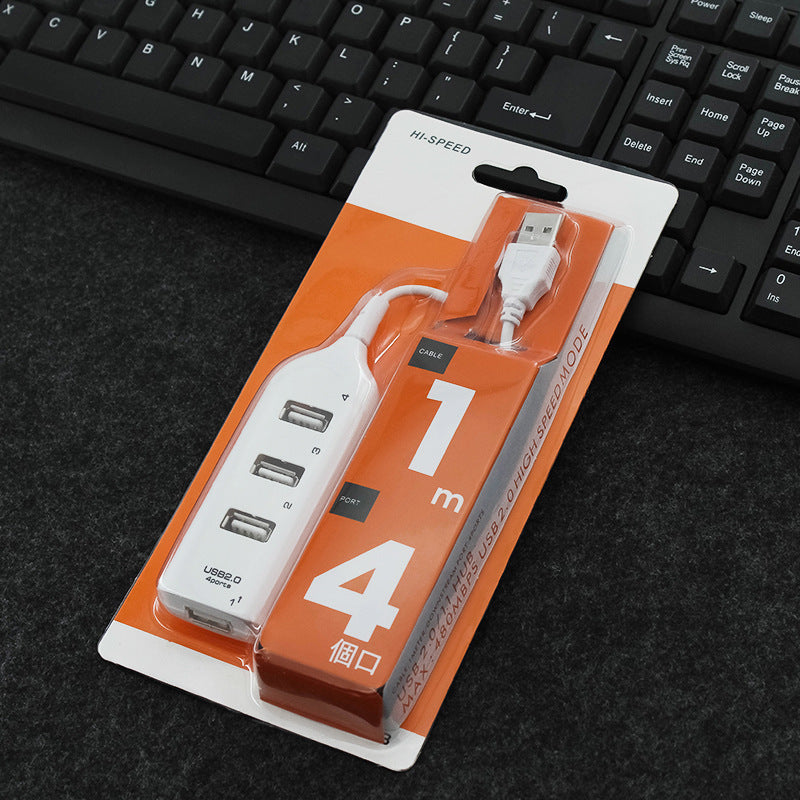
- Four USB 2.0 ports, numbered 1–4 — four full-size USB-A ports arranged in a row on the hub body, all active at the same time; numbered ports make it easy to identify which device is connected where
- USB 2.0 transmission speed — supports up to 480 Mbps USB 2.0 data transfer, suitable for keyboards, mice, USB drives, card readers, printers, webcams, phone charging cables, and other standard USB peripherals
- Fixed USB-A cable — a short cable with a USB-A plug connects the hub to your computer's existing USB-A port; no additional cable required
- Plug-and-play — connects and works immediately on any USB-A host port; no driver installation required on Windows, macOS, or Linux systems that support standard USB HID
- Compact white plastic body, 60 g — light enough to sit on a desk without pulling cables, or drop into a bag for travel; the 60 g weight means it adds nothing meaningful to carry
- External power supply supported — the product supports connection of an external power supply for powering bus-powered peripherals that require more current than the host USB port provides alone
Who This Hub Is Best Suited For
- Desktop and laptop users who have run out of USB ports — the most common use case; a hub that adds four ports from one is the direct, no-setup fix
- Home office workers who have a fixed set of USB peripherals (mouse, keyboard, printer, external drive) and need them all connected simultaneously without a port conflict
- Students and travellers who want a lightweight way to expand USB connectivity on a laptop without carrying anything heavy or complicated
- Anyone connecting USB 2.0 peripherals — for devices that operate at USB 2.0 speeds (the vast majority of everyday peripherals including mice, keyboards, webcams, card readers, and phone cables), USB 2.0 hub speed is fully adequate
How to Use It
Plug the hub's USB-A cable into any available USB-A port on your computer. All four ports on the hub become immediately available. Connect up to four USB devices simultaneously. No drivers, no settings, no power adapter required for standard low-power peripherals. For peripherals that draw higher current (such as some external hard drives), use the external power supply option.
Common Questions Before Buying
Does it work with USB 3.0 ports?
Yes — the hub plugs into any standard USB-A port including USB 3.0 ports. The hub operates at USB 2.0 speeds regardless of the host port speed. Devices connected to the hub will run at USB 2.0 rates.
Do all four ports work at the same time?
Yes — all four ports are active simultaneously. Total bandwidth is shared across connected devices, which is standard for all USB 2.0 hubs.
Does it need a driver?
No — it is plug-and-play on standard operating systems. No driver installation is required.
Can it charge phones and tablets?
The hub provides USB bus power to connected devices. Phone charging via USB is supported for devices that charge via USB-A cables. Charge speed depends on the host port's available current and the device being charged.
Can it power an external hard drive?
Some external hard drives require more current than a bus-powered hub can provide from a single USB host port. The hub supports an external power supply connection for higher-demand peripherals.
Frequently Asked Questions
Q: How many ports does it have?
A: Four USB 2.0 ports.
Q: What colour is it available in?
A: White.
Q: How much does it weigh?
A: 60 grams.
Q: What USB standard does it use?
A: USB 2.0, supporting up to 480 Mbps data transfer speed.
Q: Does it need its own power supply?
A: No external power supply is required for standard low-power USB peripherals. An external power supply connection is supported for higher-demand devices.
Q: What operating systems does it work with?
A: It is plug-and-play on Windows, macOS, and Linux systems that support standard USB. No driver installation is needed.
Q: Does the cable detach?
A: No — the USB-A cable is fixed to the hub body.
Q: Is it compatible with USB 3.0 devices?
A: USB 3.0 devices will connect and function via the hub at USB 2.0 speeds. Full USB 3.0 speeds require a USB 3.0 hub.
Add the 4-Port USB 2.0 Hub to your cart now — and connect everything that needs a port, all at once.
Share