spendo
Mobile Gaming Grip with Trigger Buttons
Mobile Gaming Grip with Trigger Buttons
Couldn't load pickup availability
Touchscreen Triggers Are Slowing You Down
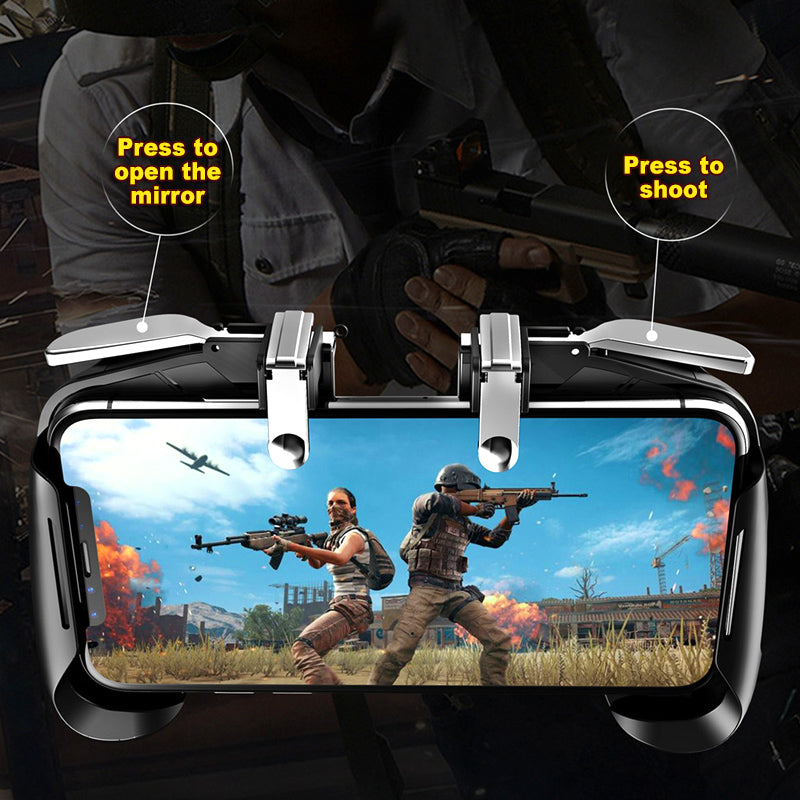
In fast-paced mobile games — shooters, battle royales, racing — tapping virtual trigger buttons on a flat screen costs you the split-second reaction time that physical controls give back instantly. This Mobile Gaming Grip with Trigger Buttons clips onto your phone, puts physical trigger buttons under your index fingers, and gives you a proper two-handed grip so your thumbs stay free for movement and aiming.
What You Get
A clamp-style phone gaming grip with:
- Two physical trigger buttons — one positioned on each side at the top of the grip, operated by your index fingers
- Ergonomic handles on each side for a two-handed hold
- A central clamp mechanism that holds your phone securely in landscape orientation
- Available in Black, Blue, and White
What the Design Does for Your Game
- Physical trigger buttons — Index-finger triggers give you dedicated fire or action inputs without covering the screen or relying on touchscreen accuracy under pressure.
- Two-handed grip handles — Holding the grip with both hands keeps your phone stable and your thumbs naturally positioned on the screen for movement and aiming — the same ergonomic layout used by dedicated handheld consoles.
- Phone clamp mount — The central clamp holds your phone in landscape orientation during play, reducing the risk of drops and keeping the screen at a consistent viewing angle.
- No wireless setup required — The physical triggers operate directly on the touchscreen surface. No Bluetooth pairing, no app, no battery needed for the grip itself.
- Three colour options — Black, Blue, and White to suit different preferences and setups.
Who Is This Grip For?
- Mobile shooter and battle royale players — Games that require rapid, precise trigger inputs benefit directly from physical buttons over virtual on-screen alternatives.
- Anyone who games for longer sessions — The two-handed grip reduces the strain of holding a phone flat in both hands for extended periods.
- Players who want physical controls without a full controller — The grip is lighter and more compact than a USB gamepad, making it better suited for casual on-the-go use.
- New mobile gamers — No setup, no pairing — clip it on and play.
How to Use It
Open the clamp and slide your phone into the grip in landscape orientation. Adjust the clamp so your phone sits securely. Hold the grip with both hands — your thumbs on the screen as usual, your index fingers resting on the physical trigger buttons. The triggers press against the touchscreen surface at the position that corresponds to your in-game trigger or action buttons. No configuration beyond game-side button placement is required.
Frequently Asked Questions
Q: Does it work with any phone?
A: The grip uses a clamp mechanism to hold phones in landscape orientation. Compatibility depends on your phone’s width fitting within the clamp’s range. Check the physical dimensions of your phone before purchasing.
Q: Does it need Bluetooth or a USB connection?
A: No. The trigger buttons make physical contact with the touchscreen surface. There is no wireless or wired connection required.
Q: Do I need to charge the grip?
A: No. The grip itself does not require any power source or charging.
Q: How many trigger buttons does it have?
A: Two — one on each side, positioned at the top of the grip for index-finger operation.
Q: What colours are available?
A: Black, Blue, and White.
Q: Will it work with a phone case on?
A: This depends on the thickness and design of your case. Slim cases are generally compatible with clamp-style grips; bulkier or raised-edge cases may affect the fit.
Q: What games is it best for?
A: Any mobile game that uses on-screen trigger or fire buttons benefits most — shooters, battle royale games, and action titles in particular.
Start Playing with Proper Trigger Controls
Physical triggers. Ergonomic two-handed grip. No setup required. If imprecise on-screen tapping has been holding back your game, this grip is a direct, no-fuss solution. Choose your colour above and add it to your cart.
Share